The MCU vs MPU question comes up regularly in embedded projects, as soon as the user interface grows beyond a handful of simple screens. With DRAM availability and cost putting increasing pressure on architecture decisions, it is worth taking a serious look: how far can a well-chosen MCU and a suitable software stack actually take you in terms of GUI?
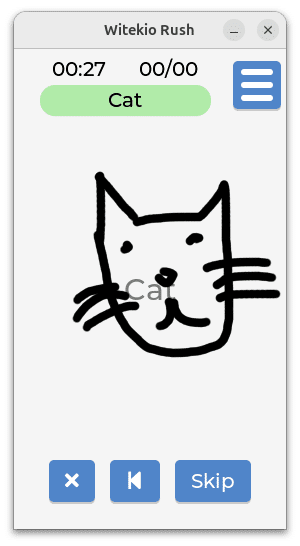
We wanted to find out for ourselves. On an NXP i.MX RT1064 board, using Zephyr as the RTOS and LVGL as the graphics library, we built an interactive drawing application coupled with an on-device image recognition model, deliberately pushing the use case to probe the real limits of the platform. What we learned along the way about trade-offs, necessary optimizations and the MCU/MPU boundary is what this article is about. No universal answer here: concrete takeaways from a real project.
The project: an interactive drawing app with on-device AI
The idea draws on Quick, Draw!, Google’s experiment where users sketch an object in 20 seconds while an AI model tries to recognize it in real time. We set out to reproduce that experience entirely on an MCU, with a deep learning model running directly on the device.
We chose this use case precisely because it is not trivial as it combines:
- real-time pixel rendering,
- continuous touch handling,
- AI inference and multi-screen navigation
Several simultaneous constraints, which makes it a far more meaningful indicator of the platform’s real capabilities than an isolated scenario.
The embedded model in numbers
Note: the GUI is currently at V1, without finalized graphical assets. V2, with animations and integrated resources, is in progress. Full GUI performance figures will be available once that stage is complete.
The technical stack
The board: NXP MIMXRT1064-EVK
The board is the NXP MIMXRT1064-EVK, based on the i.MX RT1064 SoC: an ARM Cortex-M7 core at 600 MHz, 1 MB of on-chip SRAM, 4 MB of integrated QSPI Flash and 256 Mbit of external SDRAM.
The display is the Rocktech RK043FN66HS-CTG shield, a 4.3-inch TFT at 480×272 pixels with a capacitive touch panel.
An important note on the hardware
The MIMXRT1064-EVK is a high-end MCU, one of the most powerful in its family. The vast majority of production MCU projects run on far more constrained parts, with a few hundred KB of RAM and a few MB of Flash.
This project is therefore a starting point rather than an exhaustive demonstration of what MCU optimization can achieve. On an STM32H5, for instance, the same feature set would require significantly more intensive optimization work. That is precisely what makes this kind of reference valuable: the headroom exists, and it is substantial.
Zephyr: declarative configuration and productivity gains
Zephyr was a natural fit thanks to its declarative configuration system (Kconfig): enabling LVGL comes down to a single line of configuration. Once set up, that configuration runs unchanged for months.
A note on accessibility
One less commonly mentioned advantage of Zephyr: it can be picked up by an application developer, whereas a bare metal setup typically requires hardware-level expertise.Vendors generally provide their own drivers. The real value Zephyr adds is the generic, unified layer it exposes on top of them, which considerably simplifies integration for teams without deep BSP experience.
One thing to watch out for: some default values can go unnoticed. In our case, the display driver was allocating a buffer sized for 720×1200 instead of the actual 480×272, unnecessarily inflating the memory footprint. That kind of detail is representative of the rigour MCU development demands: every KB counts, and the configuration deserves an explicit audit.
LVGL: iterate on desktop, deploy on board
One of the things we appreciated early on with LVGL is that it runs the same way on a development workstation and on the target board. In practice, that means you can iterate on the UI layer on desktop and only flash to the board when you need to. It sounds simple, but it makes a real difference to the development pace.
Beyond that, LVGL covers the essentials well:
- a solid set of native widgets,
- conversion tools to embed assets and fonts directly into the binary without a file system,
- and timer utilities that handle asynchronous behavior cleanly within the library’s own model.
Nothing exotic, but it all fits together in a way that works well in an RTOS context.
Witekio Tips: getting started with LVGL
Graphics rendering trade-offs on MCU
The drawing feature is where the platform constraints became most concrete for us. On MPU, the natural approach is to store all traced points and redraw them in full at each frame, which allows clean, unlimited undo. On MCU, doing that becomes costly enough to block the user interface as the drawing grows.
After looking at the options, we went with rendering directly into a buffer as input is captured, and saving copies of that buffer at defined intervals to handle undo. It means the number of undo steps is bounded by the number of allocated buffers, but the interface stays fluid throughout. Not the most academically elegant solution, but the right one given the constraints.
Worth noting more broadly
This kind of trade-off between UI fluency and functional richness comes up in other MCU contexts too:
Memory and CPU constraints push you toward decisions that are often deferred on MPU, sometimes without good reason. It is also, frankly, what makes MCU development useful as a discipline: every decision has a visible cost, which tends to produce leaner and better-understood systems.
Performance figures
While measurement work on this project is still ongoing as the V2 GUI, with animations and finalized graphical assets, is not yet complete, we can already share the figures for the AI layer, which is stable. Full GUI performance data will follow once V2 is wrapped up.
AI performance (stable figures)
These numbers point to something more fundamental: on MCU, memory management is explicit and deliberate. Every allocation, whether for the AI model, graphics buffers or UI resources, is a conscious choice.
That is a real overhead compared to MPU development, where abundant RAM often allows those decisions to be deferred. It is not a blocker. In fact, it tends to produce better-understood and more maintainable systems. But it is a factor to factor honestly into development cost estimates.
MCU vs MPU: decision criteria
What this project confirmed above all is that the MCU/MPU question deserves to be genuinely asked, rather than settled by reflex. We ran on MCU a GUI that many teams would have automatically handed to an MPU.
Does that mean MCU is always the right answer? No. The answer depends on the project, the expected rendering quality, connectivity requirements, power consumption and maintenance constraints. It also depends on how much optimization you are prepared to invest and whether you have the means to do it.
When MCU is a serious option
MCU is a strong candidate when the GUI scope is well-defined, when heavy processing is either absent or offloaded to a server or co-processor, and when cost or supply constraints push toward simpler components. In that context, the development overhead of explicit memory management is offset by greater system-level control.
When MPU is the right call
MPU remains the right choice for visually demanding GUIs involving transparency, blending, complex animations or video, for applications requiring a substantial BSP (Bluetooth, HTTP, MQTT, data reporting), or when the overall application complexity exceeds what manual memory management can realistically sustain.
A concrete example: a high-end coffee machine with 3D rendering, fluid animations and cloud connectivity is not the right ground for a standard MCU. The evaluation needs to be made on a project-by-project basis, driven by precise technical criteria rather than design habits.
Current DRAM pressure
The availability and cost of DRAM, a key component in MPU-based designs, continue to weigh on embedded projects. In that context, reconsidering MCU is not a fallback choice but a grounded architecture decision. The tools are there and the performance is sufficient for a broad range of use cases. The question is whether your project is one of them.Alternatives worth considering
This experience is based on Zephyr and LVGL. Other stacks are worth considering depending on the project context.
ThreadX (Azure RTOS)
A deterministic RTOS with a very small footprint, open source since 2022 (MIT license). Popular in certified systems. Different philosophy from Zephyr: fewer built-in modules, more low-level control. Worth considering when certification requirements or hard real-time determinism are the primary constraints.
Qt for MCU
A commercial solution that brings the Qt design system to microcontrollers. A notable strength: QML code reuse between Qt for MCU and standard Qt, which can significantly reduce porting costs if the team already works in Qt. Richer design tooling, but the licensing model needs to be evaluated against project volume and context.
Key takeaways
We set out to answer a specific question: how far can you push an MCU when you take the stack seriously? For this use case, the answer is clear and exceeded our expectations. A well-sized MCU running Zephyr and LVGL can support fluid, responsive and feature-rich GUIs, including with on-device AI.
What we learned along the way is equally useful: MCU development requires discipline in memory management, early code structure decisions and conscious trade-offs between fluency and functionality. That is not an obstacle. It is also what produces predictable, right-sized and maintainable systems.
This project is a starting point. We have barely scratched the surface of what MCU optimization can achieve: a more constrained part, a different stack, tighter trade-offs all open up avenues we intend to keep exploring. If you are facing this kind of architecture decision, we hope this account gives you some concrete elements to work with.
Working on an embedded GUI project?
Witekio supports clients across the embedded systems development lifecycle, from architecture choices to software integration. If you are navigating MCU/MPU decisions or dealing with GUI performance constraints on embedded platforms, feel free to get in touch with our team.